Breaking Down System Barriers: Cross-System PDF Continuation Printing and Selective Printing
There’s no need to modify existing business systems—as long as they can export PDFs, you can gain sophisticated printing capabilities such as continuation printing, selective printing, and single-page extraction.
Since systems from different vendors vary, something as simple as printing has become one of the most easily overlooked bottlenecks in cross-system collaboration.
In healthcare and other industry-wide digital transformation scenarios, cross-system printing remains a frequent pain point: systems from different vendors use different formats, and their native printing capabilities vary widely—some support continued printing, while others do not; some allow selective printing of specific areas, while others can only output entire pages; some handle headers and footers properly, while others produce output with formatting errors.
Every time a new system is implemented, the printing logic must be readjusted. This isn’t because any single system is inadequate; rather, systems from different vendors lack uniformity in their underlying design, which inadvertently leads to high costs, lengthy implementation cycles, and coordination challenges.
I. Using PDF as a Standard Bridge to Solve Cross-System Printing Challenges
As a globally recognized standard for formatted documents, PDF features a fixed format and consistent display across devices; virtually all business systems support exporting PDF files. However, the native printing capabilities of the vast majority of systems are limited to “full-page printing,” failing to meet the sophisticated requirements—such as continuous printing and selective area printing—needed in scenarios like clinical forms and government documents.
Leveraging AI-powered PDF parsing and control capabilities, Duchang has developed an independent, unified PDF printing solution. Without the need to modify existing business systems or integrate interfaces—as long as a system can export PDFs—it provides advanced printing capabilities such as continuous printing, region selection, and custom page numbering, truly achieving “one PDF, one unified printing experience.”
II. Three Core Capabilities, Precisely Tailored to Essential Printing Needs
1. Smart Resume Printing: Click Anywhere, Start Printing from There
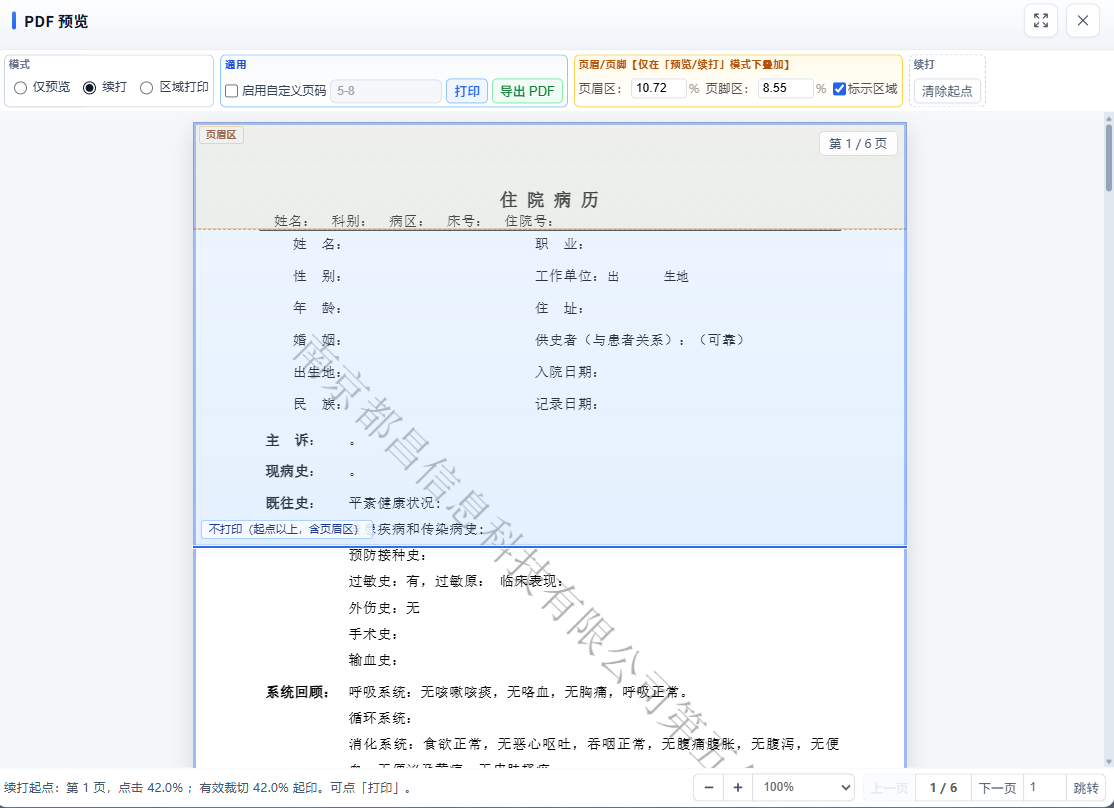
After opening a PDF and switching to resume printing mode, simply click anywhere on the page to set that location as the starting point for resume printing. Pages preceding the starting point are completely skipped, eliminating the need to print blank pages. More importantly, the system intelligently determines the printing context based on the click location:
Clicking the header area: Print the entire current page, then continue printing subsequent pages normally—suitable for scenarios where the current page’s content hasn’t been fully printed and the entire page needs to be reprinted.
Clicking the footer area: Skip the entire current page and start printing from the next page—suitable for scenarios where the current page has already been printed and you need to skip directly to the next page.
Clicking the main text area: Printing starts from the click location, automatically masking previously printed content above and redundant footer areas—suitable for high-frequency business scenarios such as resuming medical records, continuing reports, and reprinting forms.
The proportions of the header and footer areas can be freely adjusted based on the actual paper size and layout; by default, each occupies 8% of the page height, accommodating the vast majority of document templates.
2. Area Selection Printing: Print Exactly Where You Select—Precise and Efficient
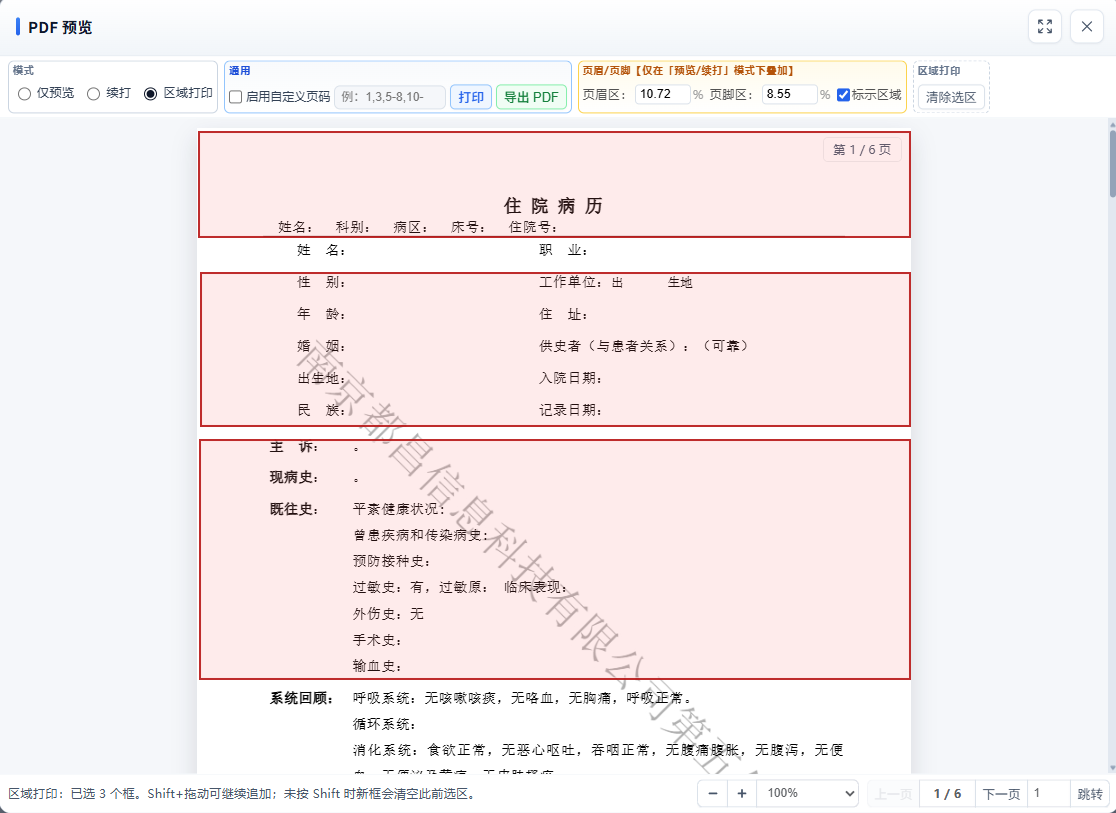
Switch to region printing mode, then drag a rectangular selection with your mouse on the page to define the area to be printed. Hold down the Shift key to add multiple selections; you don’t have to select the entire area in one go. Non-selected areas are automatically masked with a white background, and only the selected content is retained in the print output. Supports:
Multiple selections on a single page: Select multiple non-contiguous areas on the same page and print them all at once.
Cross-page selection: Select areas on different pages separately and print them all in a single batch.
High-definition output: Selected content is output using high-resolution sampling, ensuring text, stamps, and table lines are clear and sharp.
This is particularly useful for scenarios such as printing specific sections of medical examination forms, printing core information from prescriptions, and reusing designated blocks in reports—printing only what is truly needed to avoid wasting paper while balancing efficiency and privacy.
3. Custom Page Number Printing: Flexible Extraction, On-Demand Output
In addition to continuing prints and selected areas, the system supports flexible and precise extraction by page number range, compatible with “single page + range” mixed formats (e.g., 1,3,5-8,12-):
Single pages: 1,3,5
Closed range: 5-8 (print pages 5 through 8)
Open range: 10- (prints from page 10 to the end of the document)
Mixed notation: 1,3,5-8,12-
The system automatically parses, deduplicates, and sorts the page numbers, while verifying the validity of the page range and providing immediate alerts if the range is exceeded. This feature is ideal for extracting key pages before archiving or printing only specific pages from multi-page documents, significantly improving printing efficiency.
III. Technical Foundation: Stable Compatibility, High-Definition Output
1. Vector-First Approach: Balancing Clarity and Performance
For continuous printing and standard printing, the vector path is prioritized: pages are copied directly from the original PDF, and white rectangles are used to cover areas that do not need to be printed. This method fully preserves the PDF’s native vector text, lines, and stamps, resulting in sharp print edges without the blurring caused by secondary rendering.
Only in scenarios requiring full-page composition—such as partial printing—is a high-resolution raster solution employed—equivalent to approximately 540 DPI sampling. At the same time, extra-large pages are automatically downsampled to prevent memory overflow, consistently striking a balance between clarity and stability.
2. Pure Front-End Operation: Secure and Controllable Data
All PDF parsing, rendering, cropping, and printing operations are completed entirely within the local browser; file data is never uploaded to a server. This is crucial for sensitive documents such as medical records and financial statements—since data never leaves the local environment, it inherently meets industry data security requirements.
3. Full System Compatibility, Zero-Modification Integration
This printing capability does not rely on any specific business system. As long as a system can export standard PDF files, simply drag and drop them to use the feature. No API integration, no system configuration changes, and no vendor-assisted modifications are required, significantly reducing implementation costs and time.
IV. Beyond Healthcare: One Solution, Reusable Across All Industries
This unified PDF printing capability is not limited to healthcare scenarios—such as reprinting medical records, printing specific sections of lab reports, or outputting designated pages of prescriptions—which are essential clinical needs.
It is also applicable to government documents, financial statements, logistics forms, manufacturing drawings… Any industry where multiple systems coexist and there is a need for precise printing can quickly achieve a consistent printing experience based on this solution.
Different systems, different vendors, and different formats all converge on a single standard format: PDF. What Duchang does is simple: at the PDF layer, we fill in the gaps in printing capabilities that all systems lack.
Duchang now officially supports the capabilities of resuming printing, selective area printing, and custom page number printing for PDFs exported from any system. We welcome everyone to reach out and try it out.
www.dc-writer.com
Nanjing Duchang Information Technology Co., Ltd.
About Author